

Running a small business involves much more than selling products or providing services. Business owners must manage marketing, customer relationships, accounting, sales, communication, and everyday operations—often without the resources of a large organization.
Fortunately, artificial intelligence is making many of these responsibilities easier to manage.

The best AI tools for small businesses can help automate repetitive tasks, create marketing content, improve customer service, organize business information, and support better decision-making. Instead of spending hours on routine activities, business owners can use AI-powered software to work more efficiently and focus on growing their companies.
However, choosing the right software is not always easy. Some AI tools are designed for general business productivity, while others specialize in accounting, email marketing, customer relationship management, graphic design, or workflow automation.
So, which tools are actually worth considering?
In this guide, we explore 15 of the best AI tools for small businesses in 2026, comparing their features, business applications, advantages, limitations, and pricing considerations. We also explain how to choose the right tools for your business type, build an affordable AI software stack, and avoid common mistakes when adopting artificial intelligence.
Whether you operate a startup, freelance business, marketing agency, consulting firm, local service company, or online store, this guide will help you find suitable AI solutions for your business.
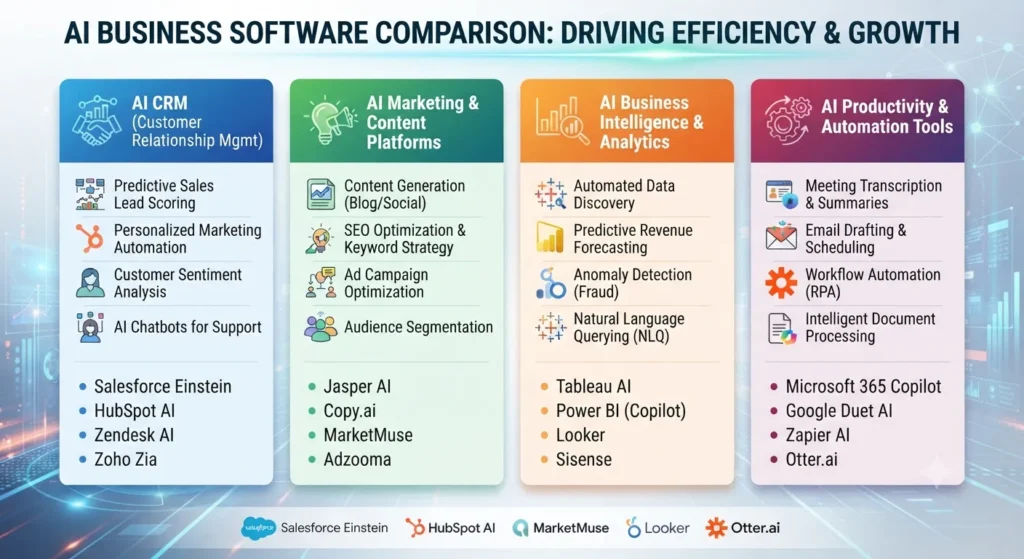
Choosing the best AI tools for small businesses can make a significant difference in productivity, customer engagement, and daily operations. Whether you run a startup, freelance business, online store, or marketing agency, the right AI solutions can help you automate repetitive tasks, reduce operational expenses, and compete more effectively. These AI tools for small businesses are especially useful for entrepreneurs who want to achieve more without hiring a large team.
Looking for budget-friendly solutions? Explore our guide to the best free AI tools for entrepreneurs] to discover useful AI platforms that can help you save money and grow your business.
Quick Comparison: 15 Best AI Tools for Small Businesses
Before exploring each platform, here is a quick overview of the top AI business tools and what they are best suited for.
| AI Tool | Best For | Free Option |
| ChatGPT | General business productivity | Yes |
| Claude | Writing and document analysis | Yes |
| Google Workspace with Gemini | Business communication and collaboration | Trial availability |
| Microsoft 365 Copilot | Office productivity | Depends on plan |
| Canva | Graphic design and marketing | Yes |
| Grammarly | Professional writing | Yes |
| Notion AI | Business documentation | Limited availability |
| Zapier | Workflow automation | Yes |
| HubSpot | CRM and sales management | Yes |
| Tidio | Customer support automation | Yes |
| Otter.ai | Meeting transcription | Yes |
| QuickBooks Online | Accounting and bookkeeping | Regional availability |
| Mailchimp | Email marketing | Limited free plan |
| Shopify Sidekick | Ecommerce management | Included with eligible Shopify plans |
| Perplexity | Research and market analysis | Yes |
Pricing, free-plan allowances, AI features, and regional availability can change. Always check the official pricing page before purchasing.
When comparing the best AI tools for small businesses, consider more than just their popularity. Look at pricing, ease of use, integrations, automation capabilities, and the specific problems each platform solves. The right AI software for small businesses should fit your budget and support your daily business activities.
What Are AI Tools for Small Businesses?
AI tools for small businesses are software applications that use artificial intelligence, machine learning, natural language processing, or automation to assist with everyday business activities.
These applications can perform tasks such as generating written content, analyzing information, answering customer questions, organizing documents, processing business data, and connecting different software platforms.
For example, a small business owner can use an AI writing assistant to draft customer emails, a design platform to create promotional graphics, and an automation tool to transfer new customer information into a CRM system.
Instead of hiring separate specialists for every repetitive task, businesses can use AI-powered software to support existing employees and improve operational efficiency.
How Can AI Help Small Businesses?
Using AI tools for small businesses can help entrepreneurs streamline marketing, sales, customer service, accounting, and project management. Instead of handling every task manually, business owners can use artificial intelligence to improve efficiency and focus on important growth opportunities.
AI can support several important business functions:
- Marketing: Generate content ideas, write promotional emails, create social media posts, and design advertisements.
- Customer service: Answer frequently asked questions, organize support requests, and assist customers through automated chat.
- Sales: Organize customer information, track potential leads, and support follow-up communication.
- Accounting: Organize expenses, generate invoices, and assist with financial reporting.
- Productivity: Summarize documents, prepare meeting notes, and organize projects.
- Research: Explore competitors, investigate industry trends, and collect information.
- Automation: Connect business applications and reduce repetitive manual work.
The biggest advantage is flexibility. A small business does not need to adopt every available AI application. It can begin with one or two tools that solve its most time-consuming problems.
15 Best AI Tools for Small Businesses in 2026
Here is a detailed look at the most useful AI-powered platforms for different business needs.
1. ChatGPT – Best Overall AI Tool for Small Businesses
Best for: Business writing, brainstorming, research assistance, marketing, planning, and everyday productivity.
ChatGPT is one of the most versatile AI assistants available to small business owners. It can help with a wide range of tasks, from writing customer emails to organizing business strategies and analyzing supported documents.
Rather than using separate applications for every writing or brainstorming activity, businesses can use ChatGPT as a general-purpose assistant.
Among the best AI tools for small businesses, ChatGPT stands out because of its versatility. Small business owners can use it for content creation, customer communication, business planning, market research, and everyday administrative tasks.
Key Features and Business Applications
- Draft professional customer emails and business proposals.
- Generate social media captions and marketing ideas.
- Create product descriptions and promotional content.
- Brainstorm business names and advertising campaigns.
- Summarize reports, documents, and meeting notes.
- Prepare project plans and standard operating procedures.
- Analyze supported files and business data.
- Develop customer communication templates.
Practical Example:
Imagine you operate a small digital marketing agency. You can use ChatGPT to prepare a client proposal, generate a monthly content calendar, brainstorm advertising ideas, and draft a campaign performance report.
This can reduce the time spent on repetitive writing and planning activities.
Advantages
- Supports multiple business functions.
- Useful for writing, research assistance, and brainstorming.
- Can work with supported documents and files.
- Offers a free starting option.
- Suitable for freelancers, startups, and established small teams.
Limitations
- AI-generated information may contain factual errors.
- Important business information requires verification.
- Outputs may need editing to match your brand voice.
- Sensitive business information should only be shared in accordance with your privacy and security requirements.
Pricing: ChatGPT offers a free plan and paid subscriptions. ChatGPT Business has separate business-oriented pricing, with costs depending on billing arrangements and availability.
Verdict: ChatGPT is an excellent starting point if you want one flexible AI assistant for several business activities.
Official website: https://chatgpt.com/
If you want to get more value from ChatGPT, read our detailed guide on how to use ChatGPT for small business to learn practical ways to improve productivity, content creation, and customer communication
2. Claude – Best AI Tool for Writing and Long Document Analysis
Best for: Business reports, proposals, detailed writing, document analysis, and professional communication.
Claude is an AI assistant developed by Anthropic. It is particularly worth considering for businesses that regularly work with lengthy documents, detailed reports, research material, and structured written communication.
Small business owners can use Claude to organize complex information, improve written content, and develop professional business documents.
Key Features and Business Applications
- Draft business proposals and professional reports.
- Summarize lengthy documents.
- Rewrite complicated information in simpler language.
- Prepare internal training materials.
- Organize research and business ideas.
- Develop structured guides and documentation.
- Assist with editing and reviewing written content.
Practical Example:
A business consultant receives a lengthy industry report from a client. Instead of manually reviewing every section, the consultant can use Claude to create an initial summary, identify important themes, and organize the findings into a structured document.
Advantages
- Useful for detailed writing and document-focused work.
- Offers a free plan.
- Supports structured writing and analysis.
- Suitable for consultants, agencies, and research-oriented businesses.
Limitations
- Generated information still requires fact-checking.
- Usage limits depend on the subscription.
- It does not replace professional legal, accounting, or financial review.
Pricing: Claude offers free and paid subscriptions, including Pro. Pricing and usage allowances should be checked on the official website.
Verdict: Claude is a strong option for small businesses that regularly create detailed documents, reports, and professional written materials.
Official website: https://claude.ai/
3. Google Workspace with Gemini – Best for Business Communication and Collaboration
Best for: Businesses that use Gmail, Google Docs, Sheets, Drive, and Meet.
Google Workspace combines business email, document creation, cloud storage, spreadsheets, and team collaboration. Its Gemini capabilities add AI assistance to supported Workspace applications.
For small businesses already using Google’s productivity ecosystem, this can be a convenient way to introduce AI into everyday operations.
Key Features and Business Applications
- Draft and improve professional emails in Gmail.
- Assist with document creation in Google Docs.
- Organize and analyze information in Google Sheets.
- Prepare meeting materials.
- Support collaboration and information management.
- Access AI assistance within supported Workspace experiences.
Practical Example:
A small consulting firm can use Gmail to manage customer communication, Google Docs to prepare proposals, and Sheets to organize business information while using eligible Gemini features to assist with these activities.
Advantages
- Integrates with familiar Google applications.
- Combines email, documents, storage, and collaboration.
- Useful for distributed teams.
- Offers business-oriented productivity plans.
Limitations
- AI capabilities depend on the Workspace edition.
- Features and usage limits can vary by region.
- Businesses using another productivity ecosystem may not benefit as much.
Pricing: Google Workspace offers several subscription plans, with pricing and Gemini features varying by country and edition.
Verdict: A practical choice for small teams that already depend on Gmail, Google Docs, and other Google productivity tools.
Official website: https://workspace.google.com/
4. Microsoft 365 Copilot – Best for Microsoft Office Productivity
Best for: Businesses using Word, Excel, PowerPoint, Outlook, and Teams.
Microsoft 365 Copilot brings AI assistance into supported Microsoft 365 applications.
It can help employees create documents, summarize information, organize spreadsheets, prepare presentations, and manage business communication.
For businesses that already use Microsoft Office, Copilot can introduce AI assistance without requiring a completely different productivity environment.
Key Features and Business Applications
- Draft and summarize documents in Word.
- Assist with spreadsheet analysis in Excel.
- Generate presentation drafts in PowerPoint.
- Summarize email conversations in Outlook.
- Support meeting preparation in Teams.
- Help organize information across supported applications.
Practical Example:
A small accounting consultancy can use Excel to organize financial information, Word to prepare reports, and PowerPoint to create client presentations. Copilot can assist with selected drafting, summarization, and analysis tasks.
Advantages
- Integrates with the Microsoft productivity ecosystem.
- Useful for businesses already using Office applications.
- Supports document and communication workflows.
- Can reduce repetitive administrative work.
Limitations
- Licensing and eligibility requirements must be checked.
- Features differ between subscriptions.
- AI-generated calculations and recommendations require verification.
Pricing: Microsoft offers different Microsoft 365 and Copilot business plans. Pricing depends on the country, licensing arrangement, and selected subscription.
Verdict: Microsoft 365 Copilot is worth evaluating if your business operates primarily through Word, Excel, Outlook, PowerPoint, and Teams.
Official website: https://www.microsoft.com/microsoft-365
5. Canva – Best AI Tool for Marketing Graphics and Visual Content
Best for: Social media graphics, advertisements, presentations, posters, and branded marketing materials.
For businesses looking for AI tools for small business marketing, Canva provides an accessible way to create professional graphics, social media posts, presentations, and promotional materials without requiring advanced design experience.
Canva is a visual design platform that helps businesses create professional-looking graphics without requiring advanced graphic design skills.

Its AI-powered features can assist with generating and editing visual content, making it useful for businesses that regularly publish promotional materials.
Key Features and Business Applications
- Create Instagram and Facebook posts.
- Design promotional advertisements.
- Prepare business presentations.
- Create posters, flyers, and brochures.
- Develop product marketing visuals.
- Maintain consistent brand templates.
- Use eligible AI tools for design and content creation.
Practical Example:
A local clothing store can use Canva to create product announcements, seasonal promotional graphics, social media posts, and discount campaign materials without hiring a designer for every project.
Advantages
- Beginner-friendly interface.
- Large collection of design templates.
- Useful for recurring marketing activities.
- Offers a free plan.
- Helps maintain consistent visual branding.
Limitations
- Advanced AI features depend on the plan.
- Templates may look generic without customization.
- Commercial licensing requirements should be reviewed.
Pricing: Canva offers Free and paid subscriptions, including Pro. Prices and feature allowances vary by market.
Verdict: Canva is one of the most practical AI-assisted design tools for small businesses that manage their own marketing.
Official website: https://www.canva.com/
For more ways to improve your online presence, explore our article on the best AI tools for digital marketing and discover AI-powered solutions for SEO, content marketing, and campaign optimization.
6. Grammarly – Best AI Writing Assistant for Professional Communication
Best for: Business emails, proposals, reports, website copy, and customer communication.
Grammarly helps improve writing clarity, grammar, tone, and readability.
For small businesses, professional communication is essential. A poorly written email or confusing product description can create unnecessary misunderstandings with customers and business partners.
Grammarly can help identify writing problems and improve communication before content is published or sent.
Key Features and Business Applications
- Check grammar and spelling.
- Improve email clarity.
- Refine website content.
- Adjust writing tone.
- Review business proposals.
- Assist with rewriting and generating text through eligible AI features.
Practical Example:
A freelance web developer can use Grammarly to review client emails, improve service descriptions, and make project proposals easier to understand.
Advantages
- Improves writing clarity.
- Useful for everyday business communication.
- Offers a free plan.
- Provides additional writing features through paid subscriptions.
Limitations
- Suggestions may not always preserve the intended meaning.
- Human review remains important.
- Advanced features require an eligible subscription.
Pricing: Grammarly provides Free, Pro, and Enterprise options. Check its official pricing page for current rates and features.
Verdict: Grammarly is a useful writing companion for businesses that frequently communicate with customers in English.
Official website: https://www.grammarly.com/
7. Notion AI – Best for Business Documentation and Team Knowledge Management
Best for: Internal documentation, project management, meeting notes, and organizing business information.
Notion combines documents, databases, project management, and team knowledge management.
Its AI features can help businesses create documents, summarize information, organize notes, and find relevant information within supported workspaces.
Key Features and Business Applications
- Create company procedures and checklists.
- Organize project documentation.
- Summarize meeting notes.
- Prepare internal training guides.
- Maintain business knowledge bases.
- Organize research and product information.
- Support team collaboration.
Practical Example:
A growing startup can use Notion to maintain employee onboarding instructions, project updates, marketing plans, and internal operating procedures in one organized workspace.
Advantages
- Combines documentation and project organization.
- Useful for managing internal knowledge.
- Supports team collaboration.
- Helps organize business processes.
Limitations
- Requires initial workspace setup.
- AI features and usage allowances depend on current plan entitlements.
- May be unnecessary for businesses with very simple documentation needs.
Pricing: Notion offers Free and paid plans, including Plus and Business. AI availability and pricing depend on the current subscription structure.
Verdict: Notion AI is worth considering if your business needs a centralized place for documents, processes, projects, and team knowledge.
Official website: https://www.notion.com/
8. Zapier – Best AI Tool for Business Workflow Automation
Best for: Connecting business applications and automating repetitive tasks.
Zapier helps businesses connect different applications so that actions in one application can automatically trigger activities in another.
For example, when a potential customer submits a website form, Zapier can transfer the information into a spreadsheet, update a CRM, or trigger a notification.
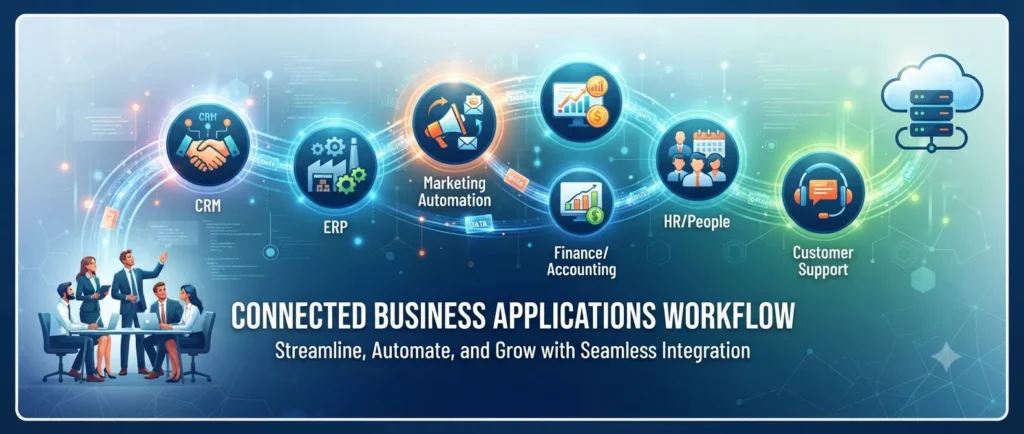
This can reduce manual data entry and make everyday workflows more efficient.
Key Features and Business Applications
- Connect supported business applications.
- Automate lead collection.
- Transfer information between software platforms.
- Create automated customer notifications.
- Generate tasks from incoming information.
- Build multi-step workflows.
- Use AI-powered steps in eligible automations.
Practical Example:
Imagine you run a small digital marketing agency. When someone fills out your website contact form, Zapier can automatically add the lead to your CRM and notify your sales team.
This eliminates several manual steps.
Advantages
- Connects a wide range of applications.
- Reduces repetitive administrative work.
- Offers a free plan.
- Supports multi-step automation on eligible subscriptions.
- Useful for businesses with several software tools.
Limitations
- Task limits depend on the subscription.
- Poorly configured workflows can create errors.
- Important automations require monitoring.
- Complex workflows may require additional setup.
Pricing: Zapier offers a Free plan and paid subscriptions. Pricing depends on the selected plan, task allowance, and billing arrangement.
Verdict: Zapier is an excellent option for small businesses that regularly transfer information between different applications.
Official website: https://zapier.com/
If you want to automate repetitive business processes, check out our list of the best AI automation tools for business to discover platforms that can simplify workflows and reduce manual work.
9. HubSpot – Best AI Tool for Customer Relationship Management
Best for: Lead management, sales pipelines, customer information, and marketing activities.
HubSpot provides customer relationship management software that helps businesses organize leads, track customer interactions, and manage sales activities.
For a growing small business, maintaining accurate customer information is important. Without a proper CRM, potential sales opportunities can easily be overlooked.
HubSpot provides a centralized environment for managing customer relationships.
Key Features and Business Applications
- Store customer contact information.
- Track potential customers and leads.
- Organize sales opportunities.
- Manage customer interactions.
- Support marketing and sales workflows.
- Use eligible AI-powered business features.
- Monitor customer and sales activity.
Practical Example:
A home renovation company can use HubSpot to track inquiries, organize customer details, monitor quotations, and follow up with potential customers.
Advantages
- Offers free foundational CRM tools.
- Combines customer management and sales functions.
- Supports growing businesses.
- Helps organize customer information.
Limitations
- Advanced features require paid subscriptions.
- Costs may increase as requirements grow.
- Accurate CRM records require regular maintenance.
Pricing: HubSpot provides free tools alongside paid products and subscription tiers. Pricing depends on the selected products, features, seats, and billing arrangements.
Verdict: HubSpot is a strong choice for businesses that want to organize customer information and improve their sales management process.
Official website: https://www.hubspot.com/
10. Tidio – Best AI Tool for Website Customer Support
Best for: Live chat, automated customer assistance, and website support.
Tidio combines live chat, customer support functionality, automation, and its Lyro AI Agent.
Businesses that receive similar customer questions repeatedly can use AI-assisted support to handle suitable inquiries and direct more complex issues to human representatives.
Key Features and Business Applications
- Answer frequently asked customer questions.
- Provide website live chat.
- Assist website visitors.
- Route conversations to human support.
- Organize customer support requests.
- Automate selected customer interactions.
Practical Example:
An online electronics store may receive repeated questions about delivery times, return policies, and product specifications. Tidio can help answer supported questions using accurate business information.
Advantages
- Combines live chat and support features.
- Offers AI-assisted customer conversations.
- Helps manage repetitive support requests.
- Can improve the initial customer support experience.
Limitations
- AI conversation allowances depend on the subscription.
- Automated responses require accurate source information.
- Complex complaints should be handled by human support staff.
Pricing: Tidio offers free and paid plans. AI-agent usage and other allowances may involve separate limits or charges.
Verdict: Tidio is worth evaluating if your website receives frequent customer questions and you want to automate suitable first-line support.
Official website: https://www.tidio.com/
11. Otter.ai – Best AI Tool for Meeting Transcription and Notes
Best for: Business meetings, interviews, online discussions, and meeting summaries.
Otter.ai is an AI-powered meeting assistant that can transcribe supported conversations and organize meeting information.
Small business owners often spend significant time taking notes, reviewing recordings, and identifying action items after meetings.
Otter.ai can help reduce this administrative workload.
Key Features and Business Applications
- Transcribe supported meetings.
- Generate meeting summaries.
- Organize discussion points.
- Help identify action items.
- Search meeting transcripts.
- Share notes with team members.
Practical Example:
A business consultant conducting several online client meetings can use Otter.ai to create transcripts and review important discussion points instead of writing every note manually.
Advantages
- Reduces manual note-taking.
- Offers a free Basic plan.
- Supports eligible meeting integrations.
- Provides search and export features on selected plans.
Limitations
- Transcription accuracy varies with audio quality and accents.
- Participants should be informed and appropriate consent obtained.
- Recording and data-retention requirements must be reviewed.
Pricing: Otter.ai provides free and paid subscriptions, with allowances and features varying by plan.
Verdict: Otter.ai is a useful option for small businesses that regularly conduct online meetings, interviews, and customer discussions.
Official website: https://otter.ai/
12. QuickBooks Online – Best AI-Assisted Accounting and Bookkeeping Tool
Best for: Invoicing, expense tracking, bookkeeping, and financial organization.
QuickBooks Online is accounting software that helps businesses organize financial information and manage essential bookkeeping activities.
Accounting is one of the most important responsibilities for small business owners. Keeping track of income, expenses, invoices, and financial reports can become difficult as a business grows.
QuickBooks provides dedicated accounting functionality, alongside automation and AI-assisted features available in eligible products and plans.
Key Features and Business Applications
- Create and manage invoices.
- Organize business expenses.
- Track income and spending.
- Prepare financial reports.
- Manage accounting records.
- Use supported automation features.
- Assist with financial organization.
Practical Example:
A freelance consultant can use QuickBooks to manage invoices, organize business expenses, and review financial reports rather than maintaining every record manually.
Advantages
- Provides dedicated accounting functionality.
- Supports financial reporting.
- Helps organize business transactions.
- Offers automation features in eligible plans.
Limitations
- Pricing and product availability differ by country.
- Tax and accounting requirements vary by jurisdiction.
- AI-assisted suggestions do not replace professional accounting advice.
Pricing: QuickBooks offers different products and plans depending on the market. Check the local pricing page before subscribing.
Verdict: QuickBooks is worth considering if your business needs dedicated accounting software rather than a general-purpose AI assistant.
Official website: https://quickbooks.intuit.com/
13. Mailchimp – Best AI Tool for Email Marketing
Best for: Email newsletters, promotional campaigns, audience management, and marketing automation.
Mailchimp is an email marketing platform that helps businesses manage audiences, send campaigns, and organize automated customer communication.
Email marketing remains a useful way to communicate with existing customers, share updates, introduce new products, and encourage repeat purchases.
Mailchimp combines campaign management with automation and eligible AI-powered content features.
Key Features and Business Applications
- Create promotional email campaigns.
- Send customer newsletters.
- Organize email audiences.
- Schedule marketing messages.
- Develop automated customer journeys.
- Use supported AI features for marketing content.
Practical Example:
An online clothing business can use Mailchimp to announce new product collections, send seasonal offers, and communicate with customers who have subscribed to its mailing list.
Advantages
- Combines email marketing and audience management.
- Offers campaign templates.
- Supports marketing automation.
- Provides a limited free option.
Limitations
- Pricing depends on audience size and subscription.
- Email sending limits vary.
- Businesses must follow applicable email marketing and privacy regulations.
Pricing: Mailchimp offers free and paid plans, with pricing depending on the contact allowance, features, and billing arrangement.
Verdict: Mailchimp is a suitable option for small businesses that want to build customer relationships through email marketing.
Official website: https://mailchimp.com/
14. Shopify Sidekick – Best AI Tool for Ecommerce Businesses
Best for: Shopify store management, ecommerce operations, and business insights.
Shopify Sidekick is an AI-powered commerce assistant designed for Shopify merchants.
It helps eligible store owners interact with Shopify store information and supported administrative workflows using natural-language instructions.
For ecommerce businesses, this can make certain store-management activities easier to understand and perform.
Key Features and Business Applications
- Get guidance about Shopify store operations.
- Work with supported store information.
- Build eligible Shopify Flow workflows.
- Analyze and summarize store information.
- Receive assistance with supported administrative tasks.
- Review proposed changes before applying them.
Practical Example:
An online store owner can use Sidekick to explore store performance information, request guidance about business operations, and work with supported automation processes.
Advantages
- Designed specifically for Shopify merchants.
- Integrated into the Shopify administration environment.
- Supports ecommerce-related workflows.
- Included with eligible Shopify plans, subject to feature availability and usage limits.
Limitations
- Designed for Shopify users rather than every ecommerce platform.
- Features vary by plan and availability.
- Important store changes should be reviewed before approval.
Pricing: Shopify Sidekick is included with eligible Shopify plans, subject to the applicable features and usage conditions.
Verdict: If your online store already runs on Shopify, Sidekick is a logical AI feature to explore before purchasing another standalone business assistant.
Official website: https://www.shopify.com/sidekick
15. Perplexity – Best AI Tool for Research and Market Analysis
Best for: Competitor research, industry research, market exploration, and source discovery.
Perplexity is an AI-powered answer and research platform that provides responses with supporting source citations.
Small business owners frequently need to research competitors, investigate customer preferences, understand market developments, and compare products.
Perplexity can help organize initial research and identify useful sources for further investigation.
Key Features and Business Applications
- Research competitors and industry developments.
- Discover relevant market information.
- Explore customer and product trends.
- Compare information from different sources.
- Prepare preliminary research summaries.
- Find references for further investigation.
Practical Example:
A startup planning to introduce a new product can use Perplexity to explore industry developments, identify competing products, and discover reports or articles relevant to its target market.
Advantages
- Provides citations alongside answers.
- Offers a free option.
- Supports deeper research features on eligible plans.
- Useful for organizing initial market research.
Limitations
- Sources must be opened and independently checked.
- Search results may not represent the entire market.
- Important business decisions require additional verification.
Pricing: Perplexity offers free and paid subscriptions, including Pro. Pricing varies according to billing arrangements and regional availability.
Verdict: Perplexity is a useful research companion for small businesses that need to investigate topics and examine the sources behind AI-generated answers.
Official website: https://www.perplexity.ai/
How to Choose the Best AI Tools for Your Small Business
Choosing AI software should be based on your business requirements, not simply on popularity.
A tool that works well for an ecommerce company may not be necessary for a freelance consultant. Similarly, an accounting platform will not solve a business’s marketing problems.
Here are seven important factors to consider before investing in AI software.
1. Identify Your Biggest Business Challenges
Start by identifying the activities that consume the most time or create unnecessary operational difficulties.
Ask yourself:
- Do you spend too much time writing emails and business documents?
- Is creating social media content becoming difficult?
- Are customer inquiries taking up too much time?
- Do you manually transfer information between applications?
- Are you struggling to organize customer details?
- Do you need better control over invoices and expenses?
- Are meetings and internal documentation difficult to manage?
Choose software that addresses a specific business problem.
For example, if your main challenge is creating marketing visuals, Canva may provide more value than purchasing an advanced CRM subscription.
2. Start With Free AI Tools or Trials
You do not need to purchase expensive software immediately.
Many AI platforms offer free plans or trial periods that allow businesses to evaluate their features.
Start by testing realistic business tasks.
For example:
- Use ChatGPT to draft a customer email.
- Try Canva to create a promotional graphic.
- Test Grammarly with a business proposal.
- Explore HubSpot to organize customer information.
- Use Zapier to automate a simple lead-generation workflow.
Evaluate the quality of the results before upgrading.
3. Compare Total Subscription Costs
The advertised starting price does not always represent the actual cost of using an AI platform.
Consider the following:
- Monthly versus annual billing.
- Per-user subscription fees.
- AI credits and usage allowances.
- Additional charges for automation.
- Integration costs.
- Contact or storage limits.
- Regional taxes and currency conversion.
- Renewal and cancellation conditions.
A seemingly inexpensive subscription can become costly when your business requires additional users or higher usage limits.
4. Check Privacy and Data Security
Business information can include confidential customer records, financial documents, employee information, and internal strategies.
Before connecting a business account or uploading files, review:
- Data usage and training policies.
- Data retention settings.
- User access permissions.
- Security documentation.
- Account protection options.
- Available administrative controls.
- Relevant contractual and regulatory requirements.
Avoid sharing passwords, payment information, confidential customer records, or other sensitive information unless the product and its data-handling arrangements have been approved for that use.
5. Check Integration With Existing Software
An AI application becomes more useful when it works with your existing business systems.
For example, a business using Gmail, Google Sheets, and a CRM may benefit from an automation platform that connects these applications.
Before subscribing, check whether the software supports your current tools.
This can prevent unnecessary duplication and reduce the time required to manage separate platforms.
6. Evaluate Ease of Use and Scalability
A powerful application is not necessarily the best choice if your team finds it difficult to use.
Consider whether:
- The interface is easy to understand.
- Employees can learn it quickly.
- Documentation and support are available.
- The software can accommodate business growth.
- Additional features can be introduced when needed.
Choose a platform that matches your current requirements while allowing room for future expansion.
7. Measure Actual Business Results
Do not assume that adopting AI automatically improves productivity.
Measure its impact using simple indicators.
| Measurement | What to Evaluate |
| Time savings | How long does a task take before and after adoption? |
| Productivity | How many tasks can be completed? |
| Accuracy | How much manual correction is required? |
| Customer service | Has response time improved? |
| Operational efficiency | How many manual steps have been removed? |
| Cost | Does the productivity improvement justify the subscription? |
Keep using a tool when its measurable benefits justify its cost and operational complexity.
Best AI Tools for Small Businesses by Industry and Business Type
Selecting the best AI tools for small businesses depends on your industry and operational requirements. Freelancers may prioritize writing and productivity applications, while ecommerce businesses may benefit more from AI-powered marketing, customer support, and store management solutions.
Different businesses have different operational requirements. The following recommendations can help you narrow down your options.
| Business Type | Recommended AI Tools | Main Purpose |
| Freelancers | ChatGPT, Claude, Grammarly | Writing, research, and client communication |
| Marketing agencies | ChatGPT, Canva, Mailchimp | Content and campaign creation |
| Online stores | Shopify Sidekick, Canva, ChatGPT | Ecommerce operations and marketing |
| Local service businesses | HubSpot, Tidio, Zapier | Lead management and customer support |
| Consultants | Claude, ChatGPT, Otter.ai | Documents, research, and meetings |
| Small office teams | Google Workspace with Gemini, Microsoft 365 Copilot, Notion | Productivity and collaboration |
| Ecommerce and retail | Shopify Sidekick, QuickBooks, Mailchimp | Store management, accounting, and marketing |
Best AI Tools for Freelancers
Freelancers often manage several responsibilities independently, including client communication, marketing, proposals, project planning, and research.
A practical starting combination includes:
- ChatGPT for everyday assistance and brainstorming.
- Claude for detailed writing and document analysis.
- Grammarly for improving client communication.
- Canva for creating promotional materials.
Best AI Tools for Marketing Agencies
Marketing agencies regularly produce content, advertisements, campaign reports, and customer communication.
Useful options include:
- ChatGPT for marketing ideas and content drafts.
- Canva for graphics and presentations.
- Mailchimp for email campaigns.
- Zapier for connecting marketing applications.
Best AI Tools for Ecommerce Businesses
Online stores need efficient ways to manage products, communicate with customers, and promote their offerings.
Consider:
- Shopify Sidekick for Shopify store assistance.
- Canva for product and promotional graphics.
- Mailchimp for email marketing.
- QuickBooks or an appropriate local accounting platform for financial records.
- Tidio for website customer support.
Best AI Tools for Local Service Businesses
Local businesses such as repair services, salons, consultants, and home service providers often need better customer management and lead follow-up.
Consider:
- HubSpot for managing customer information.
- Tidio for website inquiries.
- Zapier for connecting applications.
- ChatGPT for business communication and marketing content.
A Simple and Affordable AI Tool Stack for a Small Business
Building an affordable collection of AI tools for small businesses does not mean subscribing to every available platform. Start with applications that address your biggest operational challenges, compare their features, and gradually expand your AI software stack as your business grows.
You do not need 15 different subscriptions to operate an AI-enabled business.
In fact, starting with too many applications can create additional complexity and unnecessary expenses.
A small, carefully selected AI stack is often more practical.
Business owners looking to improve their marketing strategy can also explore our guide to the best AI marketing tools for small businesses, covering solutions for content creation, advertising, social media, and lead generation.
AI Tool Stack for a Solo Business Owner
If you operate independently, consider starting with:
- ChatGPT or Claude: Writing, brainstorming, research assistance, and business planning.
- Canva: Social media graphics and promotional materials.
- Grammarly: Editing customer-facing communication.
This combination supports several everyday activities without requiring a large software budget.
AI Tool Stack for a Small Service Business
For a small consultancy, agency, or local service company, consider:
- ChatGPT: Content creation and business communication.
- HubSpot: Customer relationship management.
- Zapier: Connecting repetitive workflows.
- Tidio: Customer support automation, if website inquiries are frequent.
This setup focuses on managing customers and reducing administrative work.
AI Tool Stack for a Small Ecommerce Business
For an online store, consider:
- Shopify Sidekick: Shopify store assistance.
- Canva: Product graphics and promotional content.
- Mailchimp: Email marketing.
- QuickBooks or suitable local accounting software: Financial organization.
Choose tools according to your ecommerce platform, location, and business requirements.
Important: These combinations are starting points rather than mandatory purchases. Avoid paying for overlapping features when your existing software already provides the functionality you need.
Benefits of Using AI Tools in Small Businesses
When selected and implemented carefully, AI software can support several areas of business operations.
1. Save Time on Repetitive Tasks
AI can assist with drafting emails, summarizing documents, organizing information, and generating content ideas.
This allows business owners to spend less time on routine administrative activities.
2. Improve Marketing Productivity
Small businesses often have limited marketing budgets.
AI-assisted design and writing applications can help create promotional materials, social media content, email campaigns, and product descriptions.
3. Support Better Customer Service
AI-powered chat and support tools can help answer common questions and organize incoming customer inquiries.
Human representatives can then focus on more complicated customer concerns.
4. Organize Business Information
AI assistants and documentation platforms can help businesses structure reports, meeting notes, project information, and internal procedures.
Better organization can make information easier to find and share.
5. Reduce Manual Data Entry
Automation platforms can connect different business applications and transfer information between them.
For example, new customer information can be transferred from a website form to a CRM without manually copying the details.
6. Support Business Research
AI research assistants can help business owners investigate competitors, explore industry developments, and discover useful sources.
However, research findings should always be verified before they influence important business decisions.
Planning to launch your own venture? Read our complete guide on how to start an online business in India to understand the essential steps involved in building an online business.
Common Mistakes to Avoid When Using AI in a Small Business
AI can improve business productivity, but adopting it without a clear strategy can create unnecessary problems.
Here are some common mistakes to avoid.
1. Using AI Without a Clear Business Objective
Do not subscribe to a platform simply because it is popular.
Identify the problem you want to solve and select software that directly addresses it.
2. Purchasing Too Many AI Subscriptions
Using multiple applications with overlapping features can increase expenses and create confusion.
Start with one or two tools and expand only when necessary.
3. Publishing AI-Generated Content Without Reviewing It
AI-generated information can contain errors, generic statements, or inaccurate claims.
Review all important content for factual accuracy, originality, relevance, and brand consistency before publication.
4. Ignoring Data Privacy
Uploading confidential customer information or internal business documents without checking data-handling policies can create security and compliance risks.
Understand the provider’s privacy practices before connecting business accounts.
5. Automating Inefficient Business Processes
Automation does not automatically make a process better.
If your existing workflow is confusing or inefficient, automate the process only after improving it.
6. Expecting AI to Replace Human Judgment
AI tools can assist with research, writing, organization, and automation, but they do not replace human accountability.
Important financial, legal, customer, and operational decisions should receive appropriate human review.
7. Ignoring the Actual Return on Investment
A tool is not valuable simply because it has advanced features.
Evaluate whether it saves time, improves accuracy, reduces operational costs, or supports better customer experiences.
Before investing in the best AI tools for small businesses, evaluate your current workflows and identify tasks that consume the most time. Compare different AI solutions based on their capabilities, subscription costs, security features, and potential return on investment.
Frequently Asked Questions About AI Tools for Small Businesses
Here are answers to common questions about selecting and using AI software in a small business.
1. What are the best AI tools for small businesses in 2026?
Some of the best AI tools for small businesses include ChatGPT for general productivity, Claude for detailed writing, Canva for graphic design, Zapier for workflow automation, HubSpot for CRM, Tidio for customer support, and Perplexity for research.
The best option depends on your business requirements, budget, and existing software.
2. Are there free AI tools for small businesses?
Yes. Several popular platforms offer free plans or limited free access.
Examples include:
- ChatGPT
- Claude
- Canva
- Grammarly
- HubSpot
- Zapier
- ai
- Perplexity
Free plans typically include usage limits, fewer advanced features, or restrictions on integrations.
3. Which AI tool is best for a small business owner?
ChatGPT is a useful starting point because it supports multiple everyday business activities, including writing, brainstorming, research assistance, document organization, and planning.
However, specialized applications may be more suitable for accounting, customer relationship management, email marketing, and workflow automation.
4. Can AI tools help small businesses save time?
Yes. AI tools can assist with repetitive activities such as drafting emails, summarizing documents, creating marketing materials, organizing information, and transferring data between applications.
Actual time savings depend on the task, implementation, and amount of human review required.
5. Are AI tools suitable for small businesses in India?
Yes. Many AI platforms are available to businesses in India.
However, subscription prices, payment options, features, billing arrangements, and taxes may differ from those in the United States.
Indian business owners should check the relevant India pricing pages before purchasing a subscription.
They should also consider applicable Indian data protection, tax, and business regulations when choosing software.
6. Can AI replace employees in a small business?
AI can automate or assist with certain repetitive activities, but it does not eliminate the need for human judgment, customer relationships, specialist knowledge, and accountability.
Small businesses should evaluate individual tasks rather than assuming that AI can replace entire job roles.
7. How many AI tools should a small business use?
Start with one or two AI tools that solve clearly identified business problems.
For example, a freelancer might begin with ChatGPT and Canva, while an ecommerce business might prioritize Shopify Sidekick and an email marketing platform.
Add more tools only when there is a measurable need.
8. Are AI tools safe for business data?
AI tools can be appropriate for business use, but safety depends on the product, subscription, configuration, and type of information being processed.
Review privacy policies, data retention, access controls, security information, and contractual terms before uploading confidential information or connecting business systems.
9. Which AI tool is best for business marketing?
Canva is a strong option for creating marketing graphics and presentations. ChatGPT can help generate content ideas and draft marketing copy, while Mailchimp supports email campaigns and marketing automation.
These tools can complement one another when their features match your marketing requirements.
10. What is the best AI tool for automating small business tasks?
Zapier is a popular choice for connecting applications and automating repetitive workflows.
It can help transfer information between supported platforms, trigger notifications, create tasks, and organize business processes.
11. Can AI tools help a startup grow?
AI tools can support startup activities such as market research, content creation, customer communication, workflow automation, and business planning.
They can help founders manage repetitive tasks more efficiently, although business growth still depends on product quality, customer demand, strategy, and execution.
12. Do small businesses need paid AI subscriptions?
Not necessarily.
Many businesses can begin with free plans and upgrade when they require additional usage, integrations, advanced features, or business administration capabilities.
The decision should be based on measurable value rather than the number of available features.
AI is transforming how entrepreneurs manage and expand their businesses. Learn more about how AI can help small businesses grow through automation, smarter decision-making, and improved customer experiences.
Final Verdict: Which AI Tools Should Small Businesses Start With?
Ultimately, the best AI tools for small businesses are those that deliver practical results without creating unnecessary expenses. Start with affordable AI software, measure its impact on productivity, and choose additional tools only when your business needs them. With the right combination of AI tools for small businesses, entrepreneurs can simplify operations and build a more efficient business.
The best AI tools for small businesses are not necessarily the most expensive or technologically advanced. They are the applications that solve real operational problems, fit existing workflows, and provide measurable value.
If you are just getting started with artificial intelligence, consider these options:
- Best overall: ChatGPT for everyday business assistance.
- Best for detailed writing: Claude for documents and reports.
- Best for visual marketing: Canva for graphics and presentations.
- Best for automation: Zapier for connecting business applications.
- Best for customer management: HubSpot for CRM and sales organization.
- Best for customer support: Tidio for website conversations.
- Best for accounting: QuickBooks Online for financial organization.
- Best for ecommerce: Shopify Sidekick for Shopify store assistance.
- Best for research: Perplexity for discovering and investigating information.
Our recommendation is simple: identify one time-consuming business task, select one appropriate AI tool, and test it using a real workflow.
Measure how much time it saves, whether it improves accuracy, and whether the subscription cost is justified before expanding your AI setup.
AI should make your business easier to operate—not give you another complicated system to manage.
If you choose the right tools and use them responsibly, artificial intelligence can become a valuable assistant in your business journey.
Start small, evaluate the results, and build an AI-powered workflow that supports your long-term business goals.
Editorial Note: This article provides a research-based comparison of vendor-described features and product capabilities. It does not claim independent hands-on testing of every platform. Product features, subscription prices, usage allowances, and availability can change. Verify current details on the official provider websites before making purchasing decisions.
Disclosure: If affiliate links are included in this article, they should be clearly disclosed. Affiliate commissions should not influence product comparisons or editorial recommendations.